









 SetPaying for Seoul transport

 Hi, I’m SeoulAslan
T-money in Apple Wallet with a Foreign Card (2026)
Checked Sept 29, 2026
Yes, on an iPhone. In the Mobile T-money app (모바일티머니), tap Foreigner on the sign-in screen, create a T-money card, add it to Apple Wallet and top it up with a foreign Mastercard, American Express, UnionPay or JCB. Visa isn't on the list. Then tap your iPhone or Apple Watch at subway gates, on buses and in taxis.
Topping up inside the Wallet app itself still needs a Korean card, so the T-money app is the way in. On Android, T-money's KOREA TOUR CARD app does a similar job and takes all five card brands.
Can I just tap? It's one of the five things I check before every trip abroad. In Seoul you can't tap your own bank card yet, but you can tap a phone that holds T-money.
Jump to: Can foreigners add it? · How to set it up · Which cards work · Fees · Where it works · Only have Visa? · Android · FAQ
Can foreigners add T-money to Apple Wallet?
Yes. T-money arrived in Apple Wallet in Korea in July 2025. Adding the card was always open to anyone, but paying for it wasn't: Apple's own support page says a South Korea-issued card is needed to buy or top up T-money from the Wallet app.
Seoul and T-money had planned to let foreign cards pay inside Apple Pay, but talks with Apple stalled, Electronic Times reported in February 2026. The fix came through T-money's own app. A March 2026 update added top-ups with foreign-issued cards, and a Foreigner button on the sign-in screen that skips Korean sign-up and identity checks.
How do I set it up with a foreign card?
- Install 모바일티머니 (Mobile T-money) from the App Store. The developer is T-money (티머니).
- On the sign-in screen, tap Foreigner. You don't need a Korean phone number or ID.
- Create a T-money card in the app and add it to Apple Wallet. It can live on your iPhone or your Apple Watch.
- Top up in the app with Apple Pay, using a foreign Mastercard, Amex, UnionPay or JCB.
- Check that Express Mode is on for the card, so you can tap without unlocking the phone.
You need an iPhone XS or later on iOS 17.2 or later, or an Apple Watch Series 6 or later on watchOS 10.2. Only prepaid T-money works in Wallet.
Screens and button names can shift with app updates. If something looks different, look for the English or Foreigner option first.
Which foreign cards work?
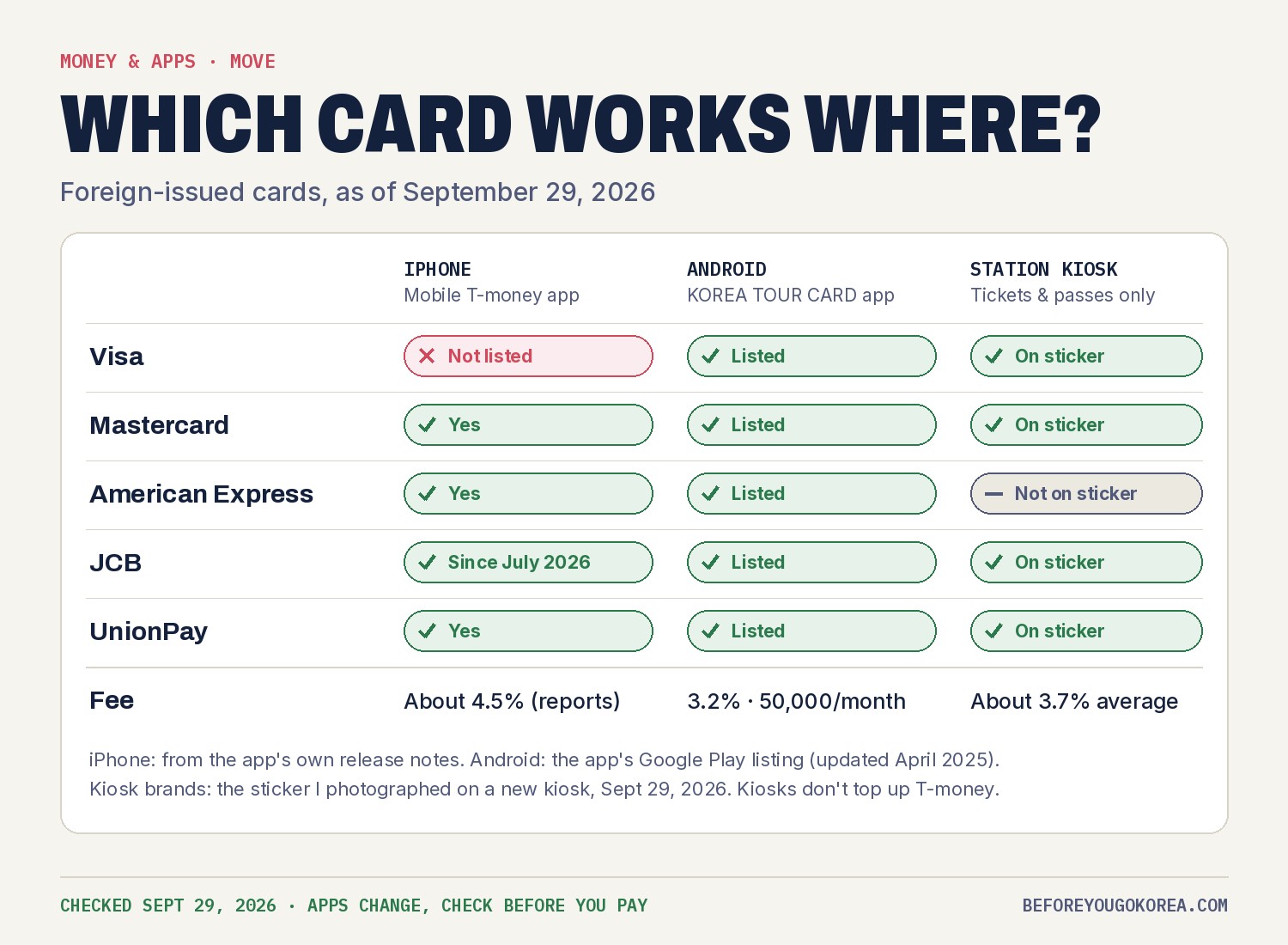
The app's own release notes are the clearest source. Version 2.4.1 (March 18, 2026) listed Mastercard, American Express and UnionPay. Version 2.4.4 (July 1, 2026) added JCB. No version so far lists Visa, and travel guides updated in September 2026 still report Visa being declined.
Mastercard also promoted the iPhone service in its own press release on April 9, 2026, so a Mastercard is the safest bet.
What does it cost?
Top-ups with a foreign card carry a service fee that travellers put at about 4.5%. I couldn't find the fee on an official T-money page, so check the total on the payment screen before you confirm. Your own bank may add its foreign transaction fee on top.
For comparison, a foreign card at the new subway ticket kiosks costs about 3.7% on average, and the Android KOREA TOUR CARD app lists 3.2%.
Top up in small amounts. You pay the fee on every top-up, and getting unused money back as a visitor isn't simple.
Where can I tap my iPhone?
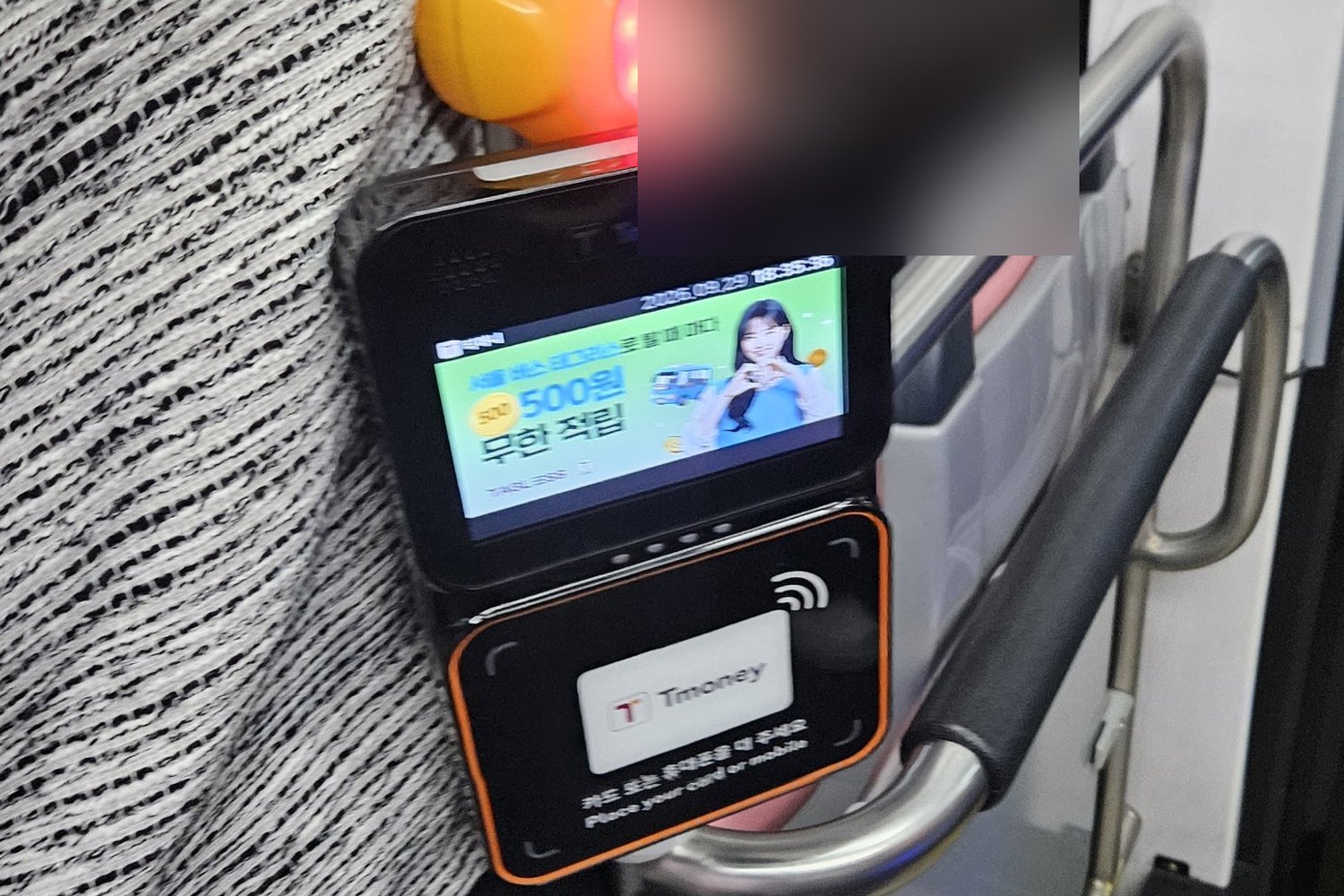
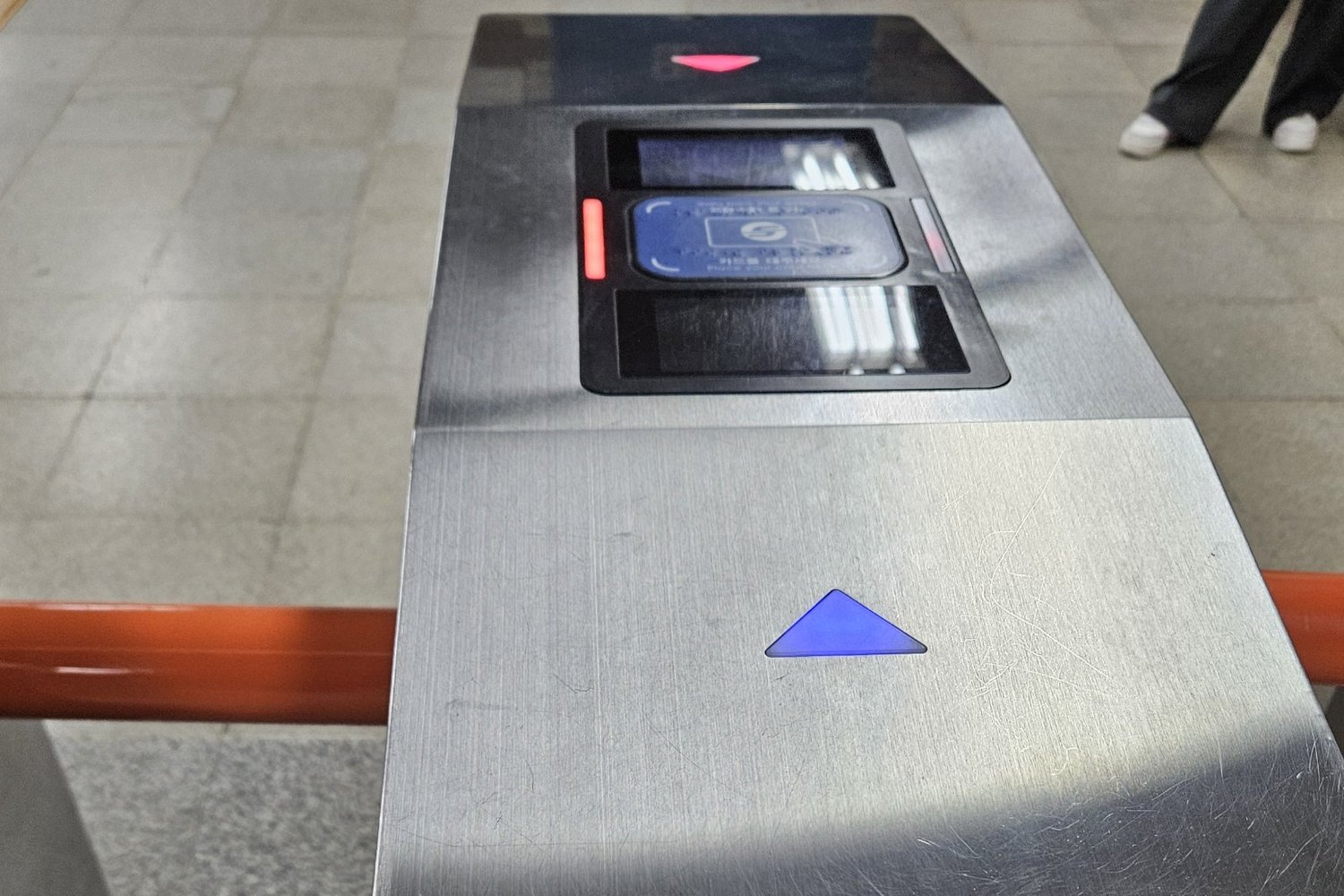
When I photographed a Seoul bus card reader on Sept 29, 2026, its English line said "Place your card or mobile". That is where the phone goes. The same works at subway gates, the blue pad in the photo at the top.
- Subway and city buses in Seoul and most of Korea. Apple says it works on most Korean transit, except some intercity buses and taxis in some regions.
- Transfers work as on a plastic T-money card. On buses, tap again when you get off.
- Taxis and convenience stores that take T-money.
One thing it can't hold: a Climate Card tourist pass. Seoul lists the pass for iPhone users on the plastic card only.
What if I only have a Visa card?
- Buy a Climate Card pass or single tickets with Visa at the new ticket kiosks on Lines 1 to 8. The kiosk sticker I photographed shows Visa.
- Use a plastic T-money card and top it up with won cash.
- On Android, the KOREA TOUR CARD app lists Visa.
Tapping the Visa card itself, or Apple Pay with it, won't open a Seoul gate. Seoul city buses are planned to take foreign cards from January 2027. More in Can you tap a contactless card on Seoul transit?
What about Android phones?
T-money's KOREA TOUR CARD Tmoney app turns an Android phone with NFC into a T-money card. Its Google Play listing says:
- Top-ups with Mastercard, Visa, Amex, JCB and UnionPay
- A 3.2% fee on card top-ups and a 50,000 won monthly limit
- A 500 won refund fee
- Android 5.0.1 or later with NFC on, and a data connection
The catch is reliability. The app was last updated in April 2025 and has a 1.7-star rating from 467 reviews, with complaints about card checks and needing Wi-Fi. Carry a plastic T-money card as a backup.
FAQ
Can foreigners use T-money in Apple Wallet?
Yes. Use the Mobile T-money app's Foreigner button, add the card to Wallet and top up with a foreign Mastercard, Amex, UnionPay or JCB.
Does Visa work for Apple Wallet T-money?
Not as of Sept 29, 2026. The app's release notes list Mastercard, Amex, UnionPay and JCB only.
Can I top up T-money in the Wallet app with my foreign card?
No. Apple says Wallet top-ups need a South Korea-issued card. Top up in the Mobile T-money app instead.
Does Apple Pay with my own credit card work at Seoul subway gates?
No. Only a T-money card inside Wallet works. Your bank card in Apple Pay won't open the gate.
Can I put the Climate Card tourist pass on my iPhone?
No. On iPhone, the pass is plastic card only.
Things I could not confirm yet:
- The exact top-up fee for foreign cards. About 4.5% comes from travel guides, not T-money.
- Top-up minimums, maximums and the balance limit for Foreigner mode.
- How a visitor gets leftover money back from an app-created T-money card.
- Whether Wallet T-money can be topped up with cash at station machines and convenience stores. Travellers say yes.
- Whether the KOREA TOUR CARD app still works well in 2026. T-money has stopped selling the plastic KOREA TOUR CARD; the app is still listed.
"Can I just tap?" is on my list before every trip. In Seoul, with the right app and card, your phone can.
More on paying for Seoul transport
- Can You Tap a Contactless Card on Seoul Transit? (2026)
- Do You Need Cash for Seoul Transport? (2026)
- T-money vs Climate Card vs WOWPASS: Which to Get (2026)
- Seoul Climate Card Tourist Pass Explained (2026)
- Can You Buy T-money at Incheon Airport When You Land? (2026)
- T-money Refund: How to Get Your Balance Back (2026)
- Seoul Transport Cost for 3, 5 or 7 Days (2026)
Sources
- Mobile T-money app, App Store listing and release notes (2.4.1 Mar 18, 2.4.4 Jul 1, 2026): apps.apple.com
- Korea JoongAng Daily on the Foreigner button (Mar 2026): koreajoongangdaily.com
- Electronic Times on the stalled Apple Pay plan (Feb 27, 2026): etnews.com
- Mastercard newsroom, T-money on iPhone for international travellers (Apr 9, 2026): mastercard.com
- Apple Newsroom Korea, T-money for Apple Pay (July 21, 2025): apple.com
- Apple Support, adding a transit card to Wallet: support.apple.com
- KOREA TOUR CARD Tmoney, Google Play listing: play.google.com
- T-money, cards for foreign tourists: tmoney.co.kr
- Seoul Metropolitan Government, Climate Card: iPhone users on plastic card (updated Sept 28, 2026): news.seoul.go.kr
- Seoul Metropolitan Government, foreign cards at 440 new machines: news.seoul.go.kr
- Travel guides on fees and Visa (Sept 2026): askkoreatravel.com, lacha.co.kr
- Photos of the gate and bus reader: Before You Go Korea, Sept 28 and 29, 2026
— SeoulAslan


Comments
Post a Comment